Inbox
Reply from the inbox
A submission arrives and you answer it right there. The reply leaves from ShipMyForm with your own address as Reply-To, so the conversation continues in your mailbox and never depends on us.
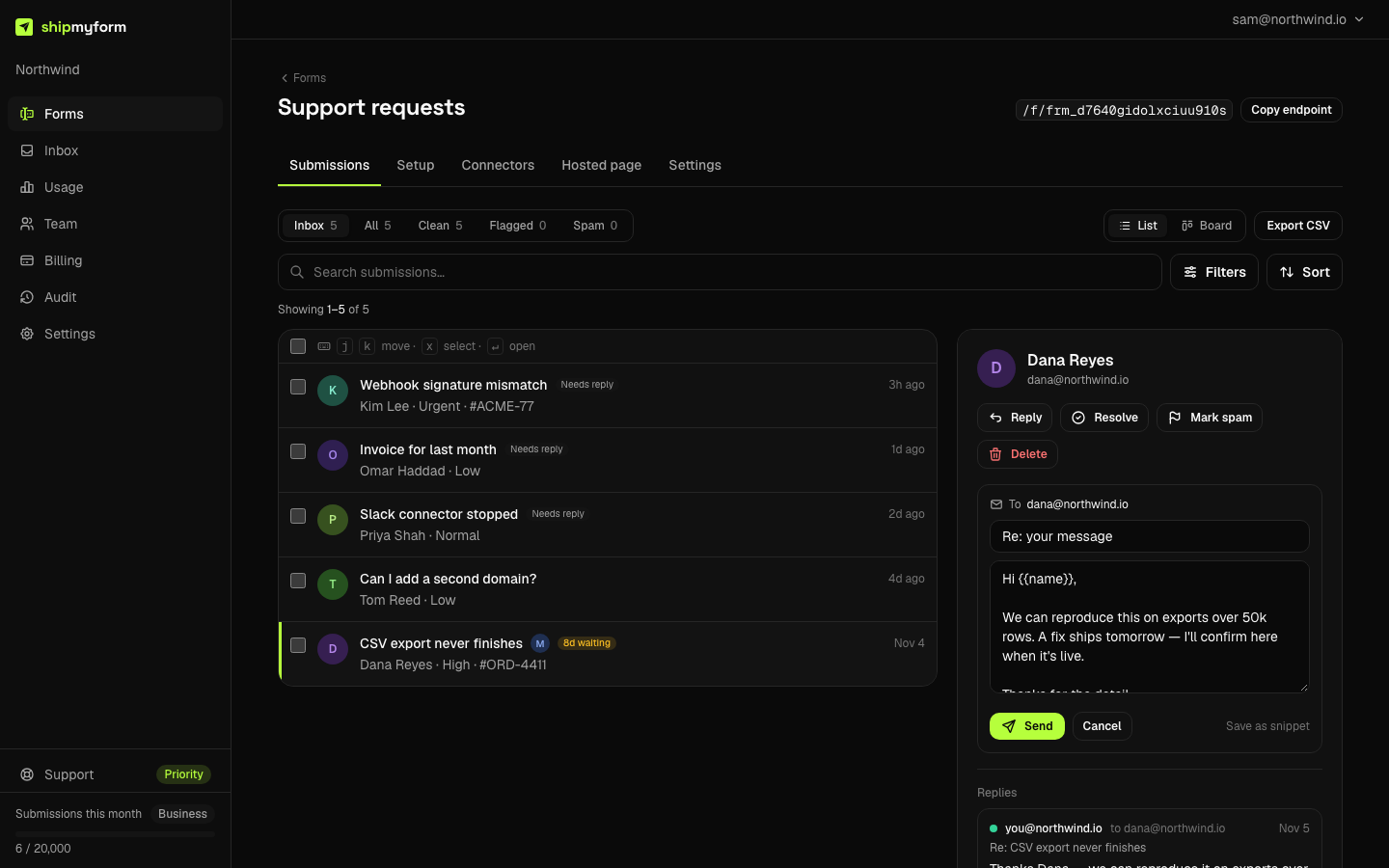
Writing a reply
Open a submission and press Reply. The address is the one found in the submission (a field named like email, otherwise the first email-shaped value); the subject defaults to Re: <form name>. The body is plain text and takes the same {{field}} tokens as the auto-reply, filled from the submission.
Hi {{name}},

We can reproduce this on exports over 50k rows. A fix ships
tomorrow — I'll confirm here when it's live.

Thanks for the detail,
Sam
The original message is quoted under your reply, the way a mail client would, so the recipient knows what is being answered without a thread to look up.
Snippets
Anything you find yourself typing twice can be saved: write it once, press Save as snippet, give it a name. Snippets are per workspace, insert into the body with one click, and can carry tokens. Delete one from the same row.
How it is sent
- From: our submissions sender, the same one your notifications come from.
- Reply-To:the first address your form's email connector notifies, else the address of whoever pressed Send. Never us.
- Checks: the pre-send address checks and suppression list every ShipMyForm email passes through; a refused reply is recorded with its reason.
- Limits: 60 an hour per workspace, 10 a day per address, and each reply counts against the email allowance.
The timeline
Every reply sits under the submission's fields: who sent it, to whom, when, and whether it went. On a support form this is also what drives the Replied / Needs reply chip on each card.
From an agent
reply_to_submissionon the MCP server sends through the same path with the same guardrails; the key's owner is recorded as the sender.
reply_to_submission {
  submissionId: "sub_…",
  body: "Hi {{name}}, thanks — fixed in tonight's deploy.",
  subject: "Re: CSV export"   // optional
}
// → { sent: true, replyId: "rpl_…", to: "[email protected]" }
FAQ
- Which plan can reply from the inbox?
- Starter and Business. On Free the detail pane still offers Reply, but as a mailto link that opens your own mail client. Replying from the inbox sends mail from our domain on your behalf, which is why it sits on the paid plans.
- Where does the submitter's answer go?
- To you. The email's Reply-To is the first address your form's email connector notifies; if the form notifies nobody, it is the address of whoever pressed Send. It is never a ShipMyForm address, so nothing about the conversation depends on us.
- Can I see what was sent?
- Yes. Every attempt is recorded on the submission — sent, or refused with the reason, or failed — and shown in a Replies timeline under the fields. A reply that never went out is visible to the person who typed it, not silently dropped.
- Why was my reply refused?
- Replies go through the same pre-send checks as every email we send: placeholder and disposable domains are refused, a domain with no mail server is refused, and an address that bounced recently is suppressed. The composer tells you which, and the attempt is kept in the timeline.
- Are there limits?
- Yes, because this is an outbound-mail surface that someone types into: 60 replies an hour per workspace and 10 a day to any one address, and each reply counts against the workspace's email allowance like a notification does. Normal use never meets them.
- Does the submitter's reply show up in ShipMyForm?
- No. The thread continues in your own mailbox, which is where you would want it; we do not parse inbound mail. The timeline shows what you sent and when.