Inbox
Form kinds
A support request is not a job application, and neither is a wedding RSVP. Tell ShipMyForm what a form is and the inbox reshapes itself: a board with the right columns, a card that leads with the right fields, a headcount or a rating histogram where a list is the wrong answer.
What each kind gives you
One inbox, one engine, nine presets. A form with no kind is the plain list you already know.
| Kind | View | A row leads with | Extra actions |
|---|---|---|---|
| contact / generic | List | Sender and message, as before | Reply, Mark done |
| multi-step | List | Project type and budget | Reply, Mark done |
| support | Board: New → Open → Waiting on customer → Resolved | Subject, priority, account or order id | Reply, Resolve, change priority |
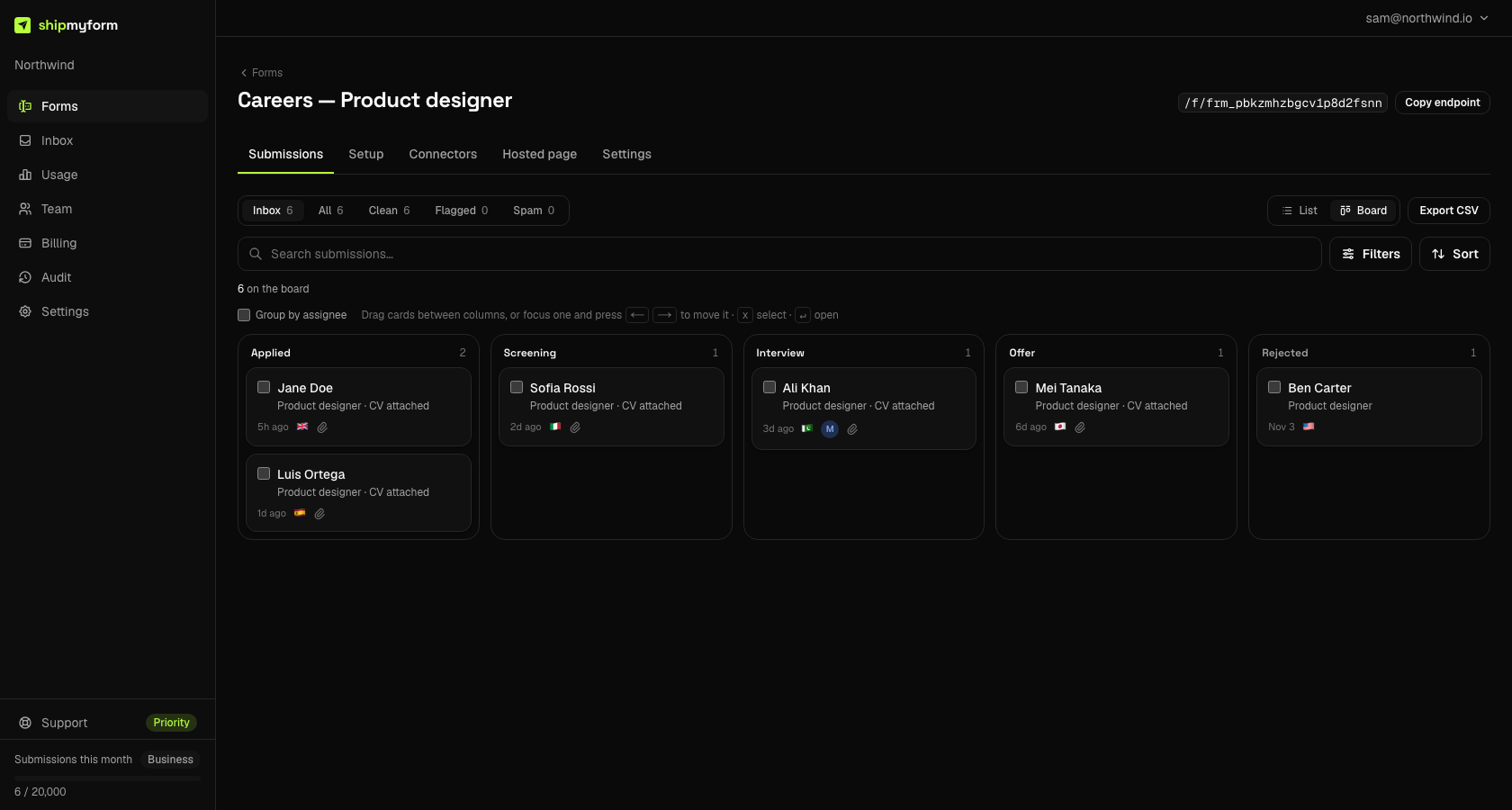
| job-application | Board: Applied → Screening → Interview → Offer → Rejected | Name, role, whether a CV came | Download CV, Reply, Reject |
| rsvp | List with a headcount | Answer and guest count | Reply, change the answer |
| waitlist | List with positions | Email, name, company | Reply |
| newsletter | List with a subscriber count and growth line | Export | |
| feedback | List with a rating histogram | Rating as stars, comments | Reply |
Board kinds open as a board until you pick otherwise; the board guide covers moving, keyboard and bulk actions.
Set the kind
Three places, same field.
- The form generator. Pick a template in the generator and “Host this form” — the hosted form arrives already typed.
- Settings → General.“What kind of form is it?” on any form, with Not set as the first option. The columns the choice implies are listed under the selector.
- The MCP server.
create_formandupdate_formacceptkind;get_formreports it and the stage keys it implies.
update_form { formId: "frm_…", kind: "job-application" }
// get_form → { kind: "job-application", stages: ["applied","screening","interview","offer","rejected"] }
How fields are matched
A kind cannot assume your field names, because people name fields anything. Each slot is matched in three passes and stops at the first hit: the names the generator uses, then a short synonym list, then — for attachments, links and numbers — the shape of the value. A slot that matches nothing is not shown; an empty “Priority” label would be worse than no label.
| Slot | Matched field names |
|---|---|
| CV / attachment | cv, resume, attachment, file, upload, document — or any field holding an uploaded file |
| Priority | priority, severity, urgency, impact |
| Account / order | account, account_id, order, order_id, order_number, customer_id, invoice, ticket, reference |
| Subject | subject, title, topic, issue, summary |
| Role | role, position, job, job_title, vacancy, applying_for, opening |
| Link | linkedin, portfolio, website, url, link, github, site — or any field holding an http(s) URL |
| Attending | attending, rsvp, attendance, coming, response |
| Guests | guests, guest_count, number_of_guests, party_size, plus_ones — or any numeric field |
| Dietary | dietary, diet, dietary_needs, dietary_requirements, allergies, food |
| Rating | rating, score, stars, nps — a number 1–5, or the generator's "4: Good" |
| Message | message, cover_letter, comments, comment, body, details, description, notes, question, feedback |
Matching is case-insensitive and ignores spaces and dashes, so Full Name, full-name and full_name are the same field.
Changing a kind later
Nothing migrates. Submissions keep their stored stage; one that is not a column on the new board shows in the first column rather than disappearing. The counts fold the same way, so the board and the list always agree. Clear the kind and the form is the plain list again.
Related
- Board & stages — moving cards, the stage vocabulary, the closed-stage retention window.
- Reply from the inbox — answer in place with the thread returning to you.
- Assign to a teammate — who has what.
FAQ
- Does setting a kind change my form or its submissions?
- No. A kind only changes how the dashboard reads what is already there. Nothing is migrated, renamed or re-sent; your form's endpoint, fields, connectors and existing submissions are exactly as they were. Set it, look, and set it back if you prefer the plain list.
- Which plan do form kinds need?
- All of them, including Free. The board, the per-kind cards and detail, the headcount, waitlist and rating summaries work on every plan. Replying from the inbox is Starter and up, and assigning to a teammate needs a second seat, which Starter and Business include.
- My field is not called "priority". Will it still be picked up?
- Probably. Each slot matches the names the form generator uses first, then a short list of synonyms (severity, urgency, impact for priority), and for attachments, links and numbers it falls back to the shape of the value. If nothing matches, the slot is simply not shown and the field stays in the full list below — you never get an empty "Priority" label.
- What happens if I change a form from support to job application?
- The columns change; the cards stay where they are. A submission whose stored stage (say, "waiting on customer") is not a column on the new board shows in the first column, and any field the new kind promotes is picked up from the existing data. Change it back and everything returns.
- Can an AI agent set the kind?
- Yes. create_form and update_form on the MCP server take a kind, and get_form reports it along with the stage vocabulary it implies. An agent building a careers page knows it is building one; this is how it tells the inbox.