No signup. No API key. No backend.
A form endpoint is just your email address.
ShipMyForm is the form backend for static sites. Put your address in the form's action: the first submission creates the form, holds the message, and emails you a one-click activation link.
- 1Paste the URL
- 2Submit once
- 3Click the email
- 4Swap in a form ID when you like
Prefer an account first? Create a form endpoint · Building with an agent? MCP server · How instant endpoints work
For AI agents
Building with an agent? Hand it this.
Paste the prompt into Cursor, Claude Code, v0, Lovable, or Bolt. It sends your agent to our llms.txt, so it wires the form from the real docs instead of guessing.
Want the agent to do the whole thing — account, forms, delivery, inbox — without a browser? That is our MCP server.
Add a working contact form to this site using ShipMyForm.

First read https://shipmyform.com/llms.txt for the integration details. Then point the form at https://shipmyform.com/f/YOUR_FORM_ID with method="POST", give every input a name attribute, include the hidden _gotcha honeypot field, and show a thank-you message on success.

When you're done, remind me to replace YOUR_FORM_ID with the form ID from my ShipMyForm dashboard (https://shipmyform.com/login, free, no card). If I don't have an account yet, ask me which email address should receive submissions and use https://shipmyform.com/to/THAT_EMAIL as the action instead; it works immediately and the first submission emails me an activation link.
Routes to the tools you already use
A real backend for your form, minus the backend.
No server, ever
Static sites on Netlify, Vercel or GitHub Pages just work. One URL, zero ops, zero cold starts.
Spam killed on arrival
Honeypot, rate limiting, heuristics and cross-form velocity, no CAPTCHA required.
Routed & retried
Async delivery with signed webhooks, a per-attempt log, and auto-disable on repeated failure.
Private by design
IPs are hashed, secrets encrypted at rest, and every tenant query is workspace-scoped.
Powering forms for
Teams already shipping their forms with ShipMyForm.



Copy, paste, ship
It's just an HTML form.
No SDK, no npm install, no API keys in your frontend. Point action at your endpoint and you're live. Plain HTML, React, fetch() or Astro.
<form action="https://shipmyform.com/f/frm_8Kx2mQ9pL4vN" method="POST">
  <input name="email" type="email" required>
  <textarea name="message"></textarea>
  <button>Send</button>
</form>The basics
What is a form backend?
A form backendis the server that catches your form submissions so you don't have to run one yourself. A static site on Netlify, Vercel or GitHub Pages has no server to receive a POST, so a contact form has nowhere to send its data. ShipMyForm is that missing endpoint.
Point your form's action at us and your page stays static, with no serverless function to maintain and no API key in your frontend, whether it's hand-written HTML, React, Astro, or AI-generated.
What happens to a submission
- 1
You point action at one URL
No server, no serverless function, no keys in your frontend.
- 2
Spam is filtered on arrival
Honeypot, rate limiting and heuristics. No CAPTCHA for real visitors.
- 3
Validated against your rules
Required fields, formats and limits, checked server-side. fetch() gets field-level errors back.
- 4
Stored and emailed to you
Every submission is saved to your inbox and sent to your email.
- 5
Routed anywhere you need
Slack, Google Sheets, Notion, a webhook, and 20+ connectors.
Data quality
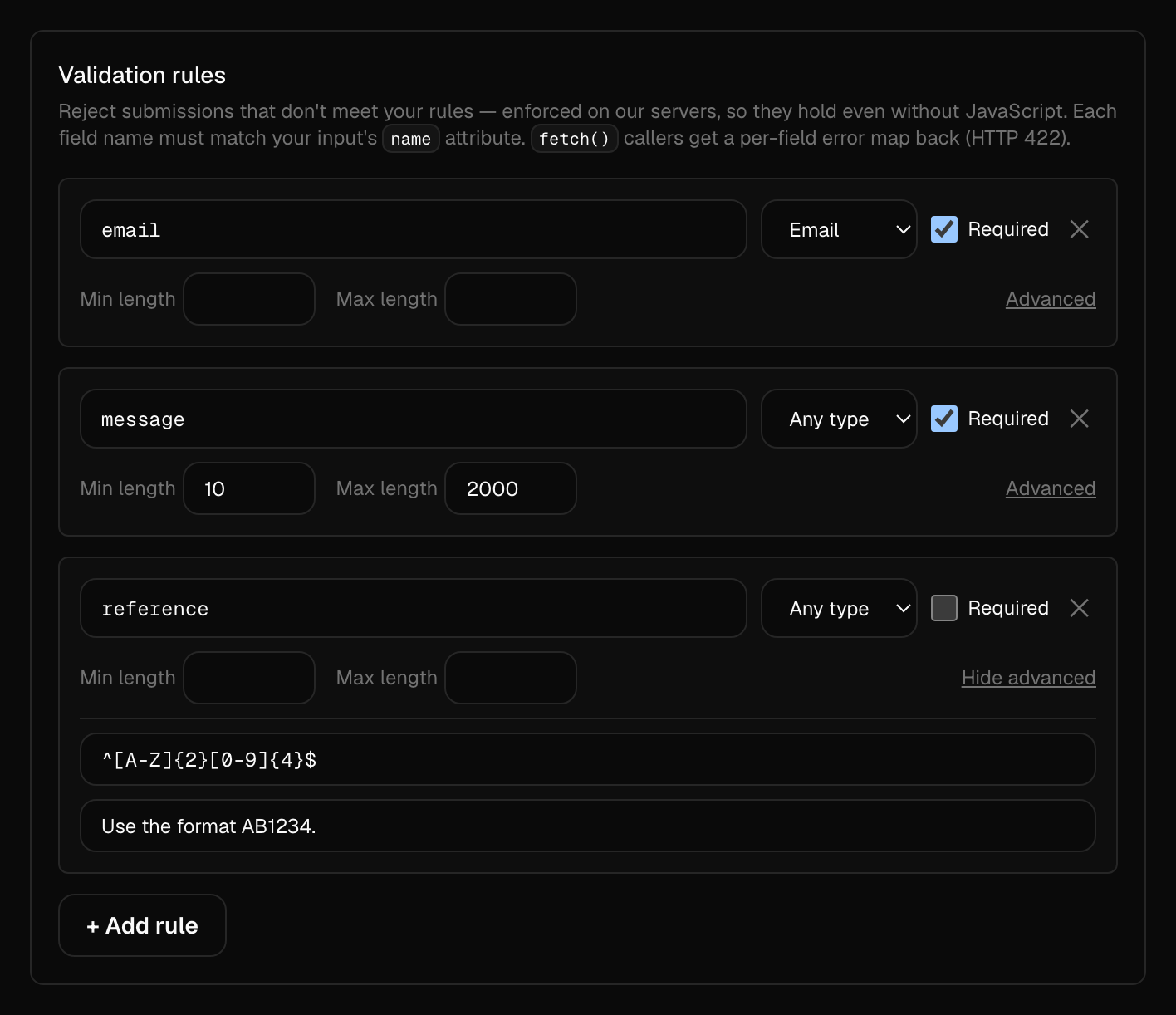
Validate submissions before they reach you
Add rules to any form in a few clicks — required fields, email and format checks, length and value limits, even a regex. They're enforced on our servers, so bad data never lands in your inbox or burns your quota, even from clients with JavaScript off.
Submitting with fetch()? Invalid submissions come back as a per-field error map you can render inline, with no backend of your own.
FAQ
Questions, answered
Yes. Point your form's action at shipmyform.com/to/[email protected] and it works from the first submission. That submission emails you an activation link; one click creates a free account for the address and turns on notifications. Until then the first ten submissions are held for 14 days.
No. A form builder like Google Forms or Typeform hosts the form itself. A form backend receives submissions from a form you already have. With ShipMyForm you keep your own HTML or framework markup and design, and it handles the storage, spam filtering, and routing behind it.
No, that is the whole point. Your site stays a set of static files on a CDN. ShipMyForm is the server, so there is nothing for you to deploy, scale, or keep warm, and no cold starts.
Yes. Because it is a standard form POST, it works with any framework or none. Plain HTML needs zero JavaScript. React, Vue, Svelte, and Astro work the same way, and there is an optional SDK for inline success states.
Yes. The free plan includes 250 submissions a month with email notifications and webhooks, and it does not require a credit card. Paid plans add connectors like Slack and Google Sheets, file uploads, and longer retention.
The Free plan is $0 forever: 250 submissions a month across 5 forms, full spam protection, and no credit card. Starter is $6 a month (or $5 a month billed yearly) for 2,000 submissions, unlimited forms, all 20+ connectors, file uploads and API access. Pro is $19 a month (or $15 a month billed yearly) for 20,000 submissions, an auto-responder, a custom domain and unlimited retention.
Every form gets an automatic honeypot field plus server-side rate limiting and heuristics, so most bot submissions are filtered before they reach your inbox, with no CAPTCHA for real visitors to solve. You can also add your own blocklist of emails, domains, or keywords, and turn on Cloudflare Turnstile if you ever need it.
Yes, on every plan. Add rules to any form — required fields, email, URL, number or phone types, length and value limits, or a regex pattern — and ShipMyForm enforces them on our servers before anything is stored. Callers using fetch() get back a per-field error map (HTTP 422) so you can show inline errors, with no backend code to write.
Yes, on the Business plan. Turn on auto-reply for a form and ShipMyForm emails a confirmation to the submitter's address on every clean submission. You write the subject and message, and can drop in {{field}} placeholders like {{name}} to personalize it. Replies go to your notification address.
Yes, on paid plans. Create an API key in your settings and read your forms and submissions over a simple REST API with an Authorization: Bearer header — list a form's submissions, paginate, and fetch a single submission as JSON. See the API docs for endpoints and examples.
Every submission is stored in your dashboard inbox and emailed to you. From there you can route it to Slack, Google Sheets, Notion, Discord, a webhook, and more than 20 other connectors.
AI built your site in 60 seconds.
Don't spend a weekend on the contact form. Ship it in one line.