Inbox
Board & stages
Every form's submissions can be a kanban board as well as a list. The columns are the form's own vocabulary — a hiring pipeline for applications, a queue for support — and moving a card is a stage change and nothing else.
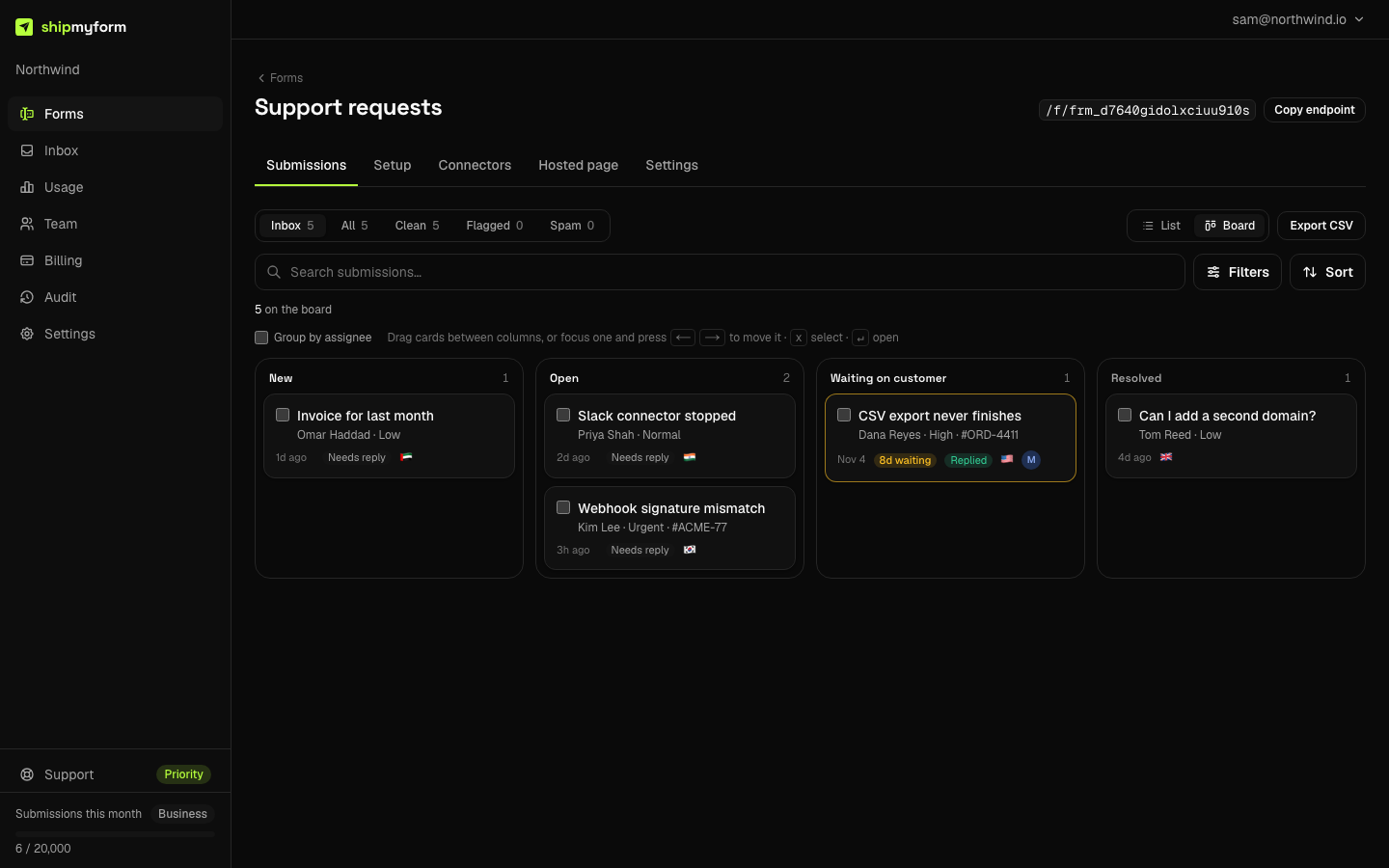
Switching views
The List / Boardtoggle sits beside the status tabs on a form's submissions page and on the workspace inbox. Your choice is remembered per account; a pipeline kind (support, job application) opens as a board until you say otherwise. The view is also in the URL as ?view=board, so a link you share opens the way you saw it.
The columns
Columns come from the form's kind. The last column of each set is terminal: cards there are out of the pipeline and never show as stale.
| Kind | Stages |
|---|---|
| support | new → open → waiting (on customer) → resolved |
| job-application | applied → screening → interview → offer → rejected |
| everything else | new → in_progress → done → archived |
Moving cards
- Drag a card between columns. Drag a selected card and the whole selection moves with it.
- Keyboard: focus a card and press ← / → to move it a column; x selects, ↵ opens.
- Bulk: select cards and use Move to… in the bar that appears.
- From the detail:every submission's detail pane has a Stage select, in the list view too — you do not have to switch to the board to move one.
Moves apply immediately and roll back if the save fails. A move writes the stage and the time it changed; it never touches the submission's data, its spam status or your connectors.
Closing in one click
Each kind has a one-click way out of the pipeline, on the detail pane and on the bulk bar: Reject on an application, Resolve on a ticket, Mark done elsewhere. It is a stage move, not a delete — nothing is lost by mistake.
A retention window for closed cards
What makes rejecting safe is the per-form window on Settings → General: “Delete rejected applications after N days” (worded for the kind). A submission is purged that many days after it reaches a terminal column — counted from the move, not from when it arrived — files included. Leave it empty and the workspace's normal retention applies. For hiring this is how you stop holding CVs you no longer need; the GDPR guide explains why that matters.
Queue signals on support boards
On a support form every open card says who spoke last — Replied when the last thing that went out was a reply from the inbox, Needs reply otherwise — and a ticket that has sat in an open column for more than seven days is flagged with how long. Open columns sort longest-waiting first. The list shows the same chips.
From an agent
The MCP server has set_submission_stage; the keys are the ones get_form reports as stages. Submissions returned by list_submissions and get_submission carry their stage.
set_submission_stage { ids: ["sub_…", "sub_…"], stage: "interview" }
// → { updated: 2, stage: "interview", ignored: 0 }
FAQ
- Does moving a card mark it as spam, or train the spam filter?
- Never. A submission's stage and its spam status are two separate fields. Spam is a filter on the board (the status tabs above it still apply), not a column, and moving a card sends nothing to the classifier. Mark spam and Not spam are still the only actions that do.
- Where does a submission start?
- In the first column. A submission that has never been moved has no stored stage and reads as the first column of whatever vocabulary its form has — applied, new, and so on. That is also why changing a form's kind needs no migration.
- Why do I only see 200 cards?
- A board shows the 200 most recent matching submissions and says so above the columns; the column counts are still the real totals under the current filters. For a form with more open work than that, narrow with the filters or switch to the list, which pages.
- What does the workspace-wide inbox board show?
- Forms of every kind mix there, so it uses the generic columns. A card from a form with its own vocabulary shows its real stage as a chip ("Waiting on customer") so it is not read as New. Filter the inbox to one form and the board takes that form's columns.
- Can I rename or add columns?
- Not yet. Columns come from the form's kind, and the kinds cover the pipelines we have seen people actually run. If yours does not fit, tell us which columns you need — that is the signal we are waiting for before adding custom ones.