Your form knows what it is. Now your inbox does too.
Tell ShipMyForm a form is for support, hiring, an RSVP or a waitlist and the inbox adapts: a kanban board with the right columns, a card that leads with the CV or the priority, a headcount, reply in place, assign to a teammate. Why we built it and what it changes.
The ShipMyForm team
· 6 min read
From today, a ShipMyForm form can say what it is — support, job application, RSVP, waitlist, newsletter, feedback — and its inbox changes shape to match. A hiring form becomes a pipeline from applied to offer with the CV one click away. A support form becomes a queue that says who spoke last. An RSVP becomes a headcount. You can reply to any submission in place, and hand it to a teammate. All of it is on every plan except replying, which is Starter and up, and none of it touches a form that has not asked for it.
Here is why we built it, and what it is not.
The problem was never the form
A form backend's job is to catch the submission and get it somewhere useful. For a contact form that is the whole story: it arrives, you get an email, you answer from your mail client, done.
But people put forms in front of work that is not a one-off. We kept seeing the same three on our customers' sites:
- A careers page on a ten-person company. Forty applications in a month, each with a CV, each needing a yes, a no, or a "let's talk".
- A support form for a product with no helpdesk yet. Tickets that need an answer, then a follow-up, then closing.
- An RSVP for a launch party. Not a pipeline at all — a count, and a list of who said no.
Every one of those was being run out of a flat list of submissions and an email inbox, with a spreadsheet on the side to remember what had been done. The form backend had done its job and then left the hard part to a Google Sheet.
The tools built for that hard part — an ATS, a helpdesk — are the wrong size for a team of three. They want seats, onboarding, a migration. Nobody sets up Greenhouse for forty applicants. So the spreadsheet wins, and the CVs sit in the inbox forever, which is its own problem.
What changed
One field on a form: what kind of form is it? The dashboard reads it and adapts.
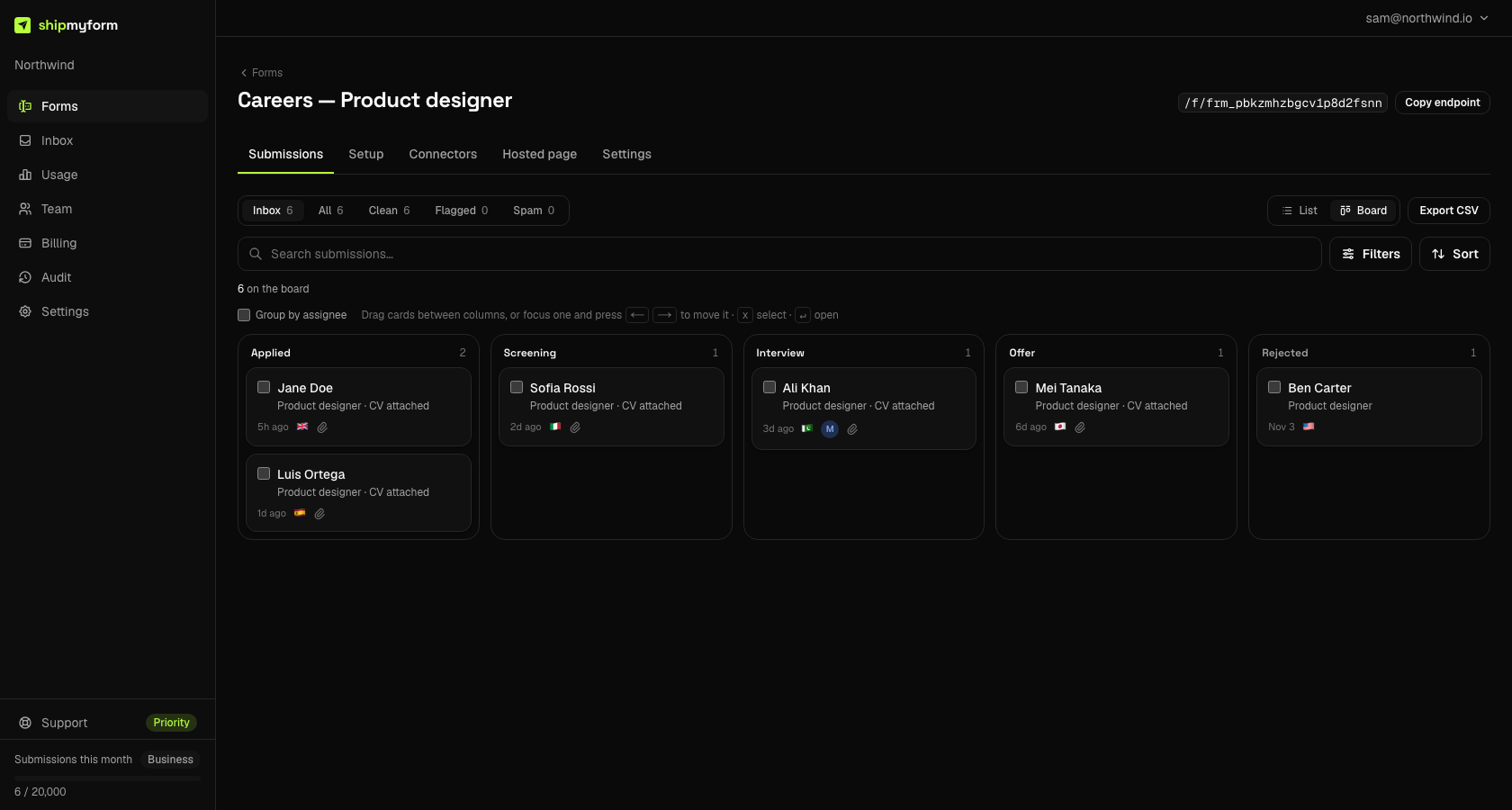
A board, with the right columns. Submissions can be a kanban as well as a list. The columns are the form's own vocabulary — applied → screening → interview → offer → rejected for hiring, new → open → waiting on customer → resolved for support, a generic set for everything else. Drag a card, or focus it and press an arrow key. Moving a card is a stage change and nothing more: it never marks anything as spam and never teaches the spam filter anything, because a pipeline and a verdict are different things.
A card that leads with what matters. An applicant card says the name, the role and whether a CV came; open it and the CV is a brand-coloured download button, not row eleven of a field dump. A ticket card says the subject, the priority and the order number. We match your field names against the ones our generator uses, then a short list of synonyms, then the shape of the value — a file is a file whatever you called it — and a slot that matches nothing is simply not shown.
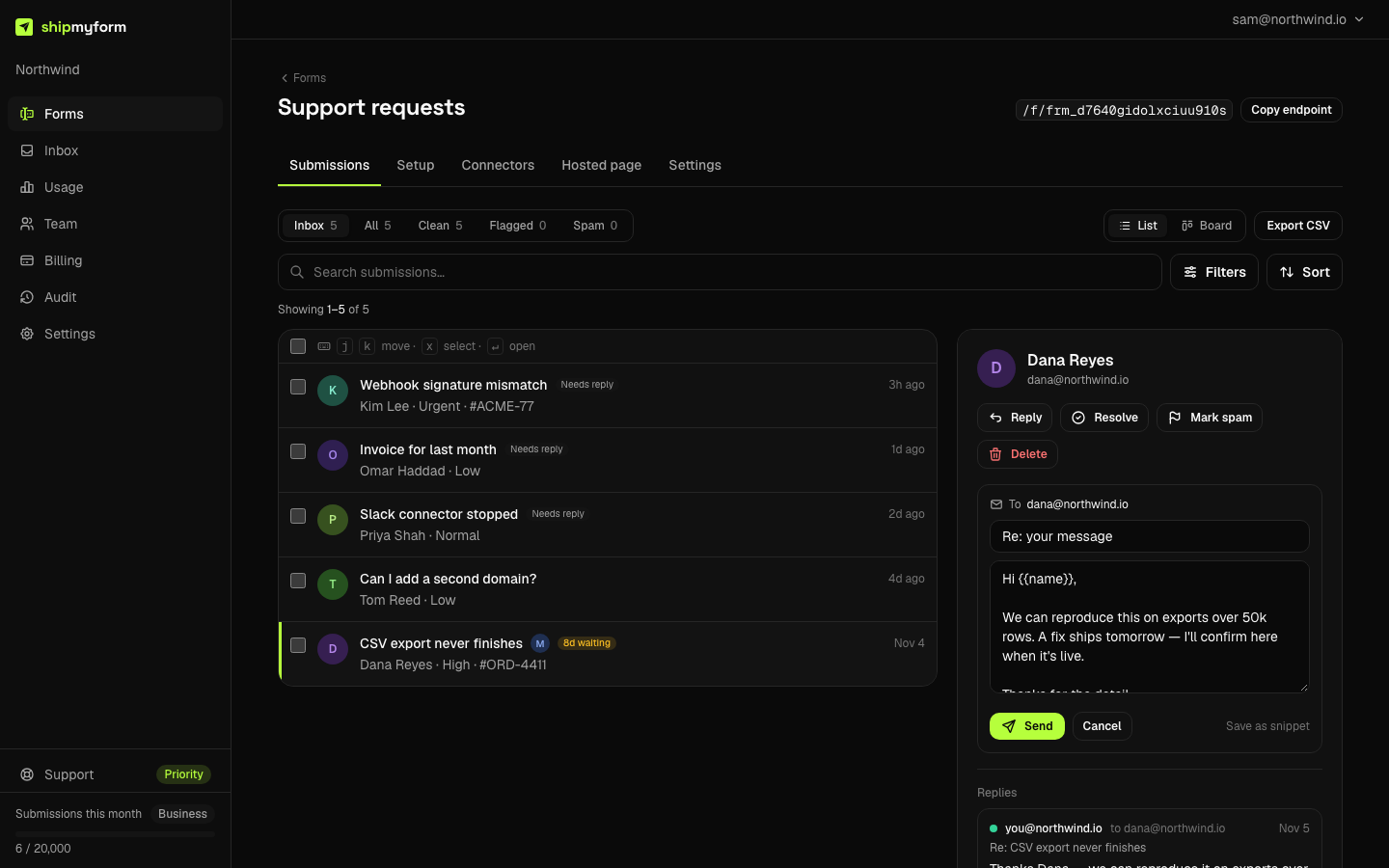
Reply in place. Answer from the detail pane and the mail leaves from ShipMyForm with your notification address as Reply-To. The conversation continues in your mailbox, where it should, and the submission keeps a timeline of what was sent — including a reply that our address checks refused, with the reason, because a reply that silently never went out is worse than one that bounced. The same {{name}} tokens as the auto-reply, and snippets for the sentence you type ten times a week.
Assign it. Hand a submission to a teammate and they get an email with a link straight to it. Filter the inbox by owner, or lane the board by person. This is the part that makes a second seat worth having; before today it bought read access to the same list.
Queue signals, where silence is the problem. On a support board every open card says Replied or Needs reply, and a ticket that has sat in an open column for a week is flagged with how long. Open columns sort longest-waiting first. Age is the signal on a support queue, and no other kind needs it, so no other kind gets it.
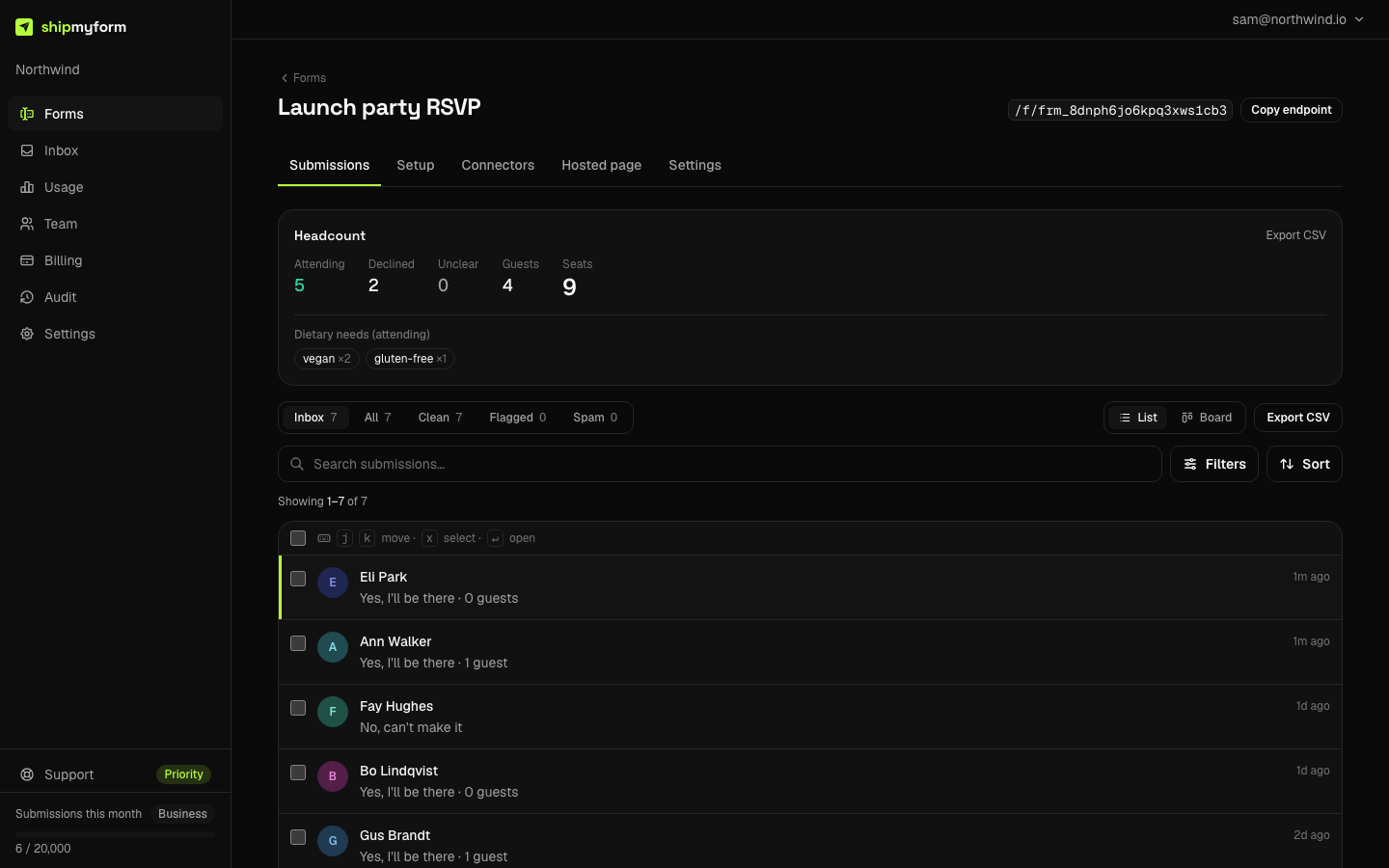
A summary where a board would be wrong. Half the catalogue does not move through stages. An RSVP gets attending / declined / seats and the dietary needs tallied. A waitlist gets positions, first signup per email, with repeats marked. A newsletter gets a subscriber count and a thirty-day line next to the export. Feedback gets a star histogram beside the average, because the average alone hides a split between delighted and furious — which is exactly the thing you wanted to know.
The part that makes rejecting safe
Rejecting an applicant is a stage move, so nothing is lost by mistake. But a rejected application with a CV attached is personal data you no longer have a reason to keep, and "we'll clean it up later" is how hiring forms fail the GDPR question we wrote about earlier this week.
So each form has a window: delete rejected applications after N days, counted from the rejection, files included. Set it once and the inbox stops being the place CVs go to live forever. The same control reads delete resolved tickets after N days on a support form.
Not an ATS, not a helpdesk. No interview scheduling, no scorecards, no macros, no SLA engine. The line is: this makes a pile of applications or tickets triageable by a small team inside the tool that already has them. If you outgrow it, you will know, and the export is right there.
For the agents
Everything above is a tool on the MCP server too: create_form and update_form take a kind, set_submission_stage moves cards, reply_to_submission answers, list_members and assign_submissions hand work out. An agent that builds your careers page from a prompt can also run the pipeline behind it, and it never needs to open a browser to do so.
Nothing happens until you ask
A form with no kind is the list it was yesterday. Open Settings → General on a form, pick what it is, and look. If you prefer the plain list, switch back; nothing was migrated either way.
The docs cover each piece: form kinds, the board and stages, replying, assignment. If your pipeline needs a column we did not think of, tell us which — that is the signal we are waiting for before adding custom ones.
Frequently asked questions
- Does this change anything for forms I already have?
- No. A form with no kind set is exactly the list it was yesterday. Nothing is migrated or re-sent. Set a kind on a form from its settings and look; clear it and the plain list is back.
- Which plans get the board and the summaries?
- All of them, including Free. Replying from the inbox is Starter and up, because it sends mail from our domain on your behalf. Assigning needs a second seat, which Starter (2) and Business (10) include.
- Is this an applicant tracking system or a helpdesk?
- No, deliberately. It makes a pile of applications or tickets triageable by a small team: a pipeline, the attachment one click away, reply in place, hand it to someone. There is no scheduling, no scorecards, no SLA engine. If you outgrow it you will know, and the CSV export is right there.
- What happens to CVs when I reject someone?
- Rejecting is a stage move, not a delete, so nothing is lost by mistake. Each form can set a window — delete rejected applications after N days, counted from the rejection — and ShipMyForm purges the submission and its files when it passes. That is the part of the GDPR guide most hiring forms skip.
- Can an AI agent use any of this?
- All of it. The MCP server gained set_submission_stage, reply_to_submission, list_members and assign_submissions, and create_form / update_form take a kind. An agent that builds your careers page can also run the pipeline behind it.
Related guides
What Is a Form Backend? (And When You Need One)
The plain-language definition, how form endpoints work, and when a hosted backend beats rolling your own.
GDPR and Your Contact Form: What You Owe, and What “Delete It” Actually Reaches
Most GDPR advice for contact forms stops at a consent checkbox you probably do not need. The harder part is deletion: the moment you forward submissions to Slack, Sheets or your inbox, deleting the original stops being the same thing as deleting the data.
Request a Quote Form: Examples & Best Practices (2026)
What to put on a request-a-quote form, real examples by industry, and the best practices that turn more visitors into qualified quote requests.